
Module 8 – Lesson 3

In this lesson you’ll learn how to:
- Send the COREgiving assessment to a client
- Generate the COREgiving report

Sending the assessment
The report is easy to use and provides helpful insight for your clients. Follow these steps to send the COREgiving assessment to a client:
Step 1
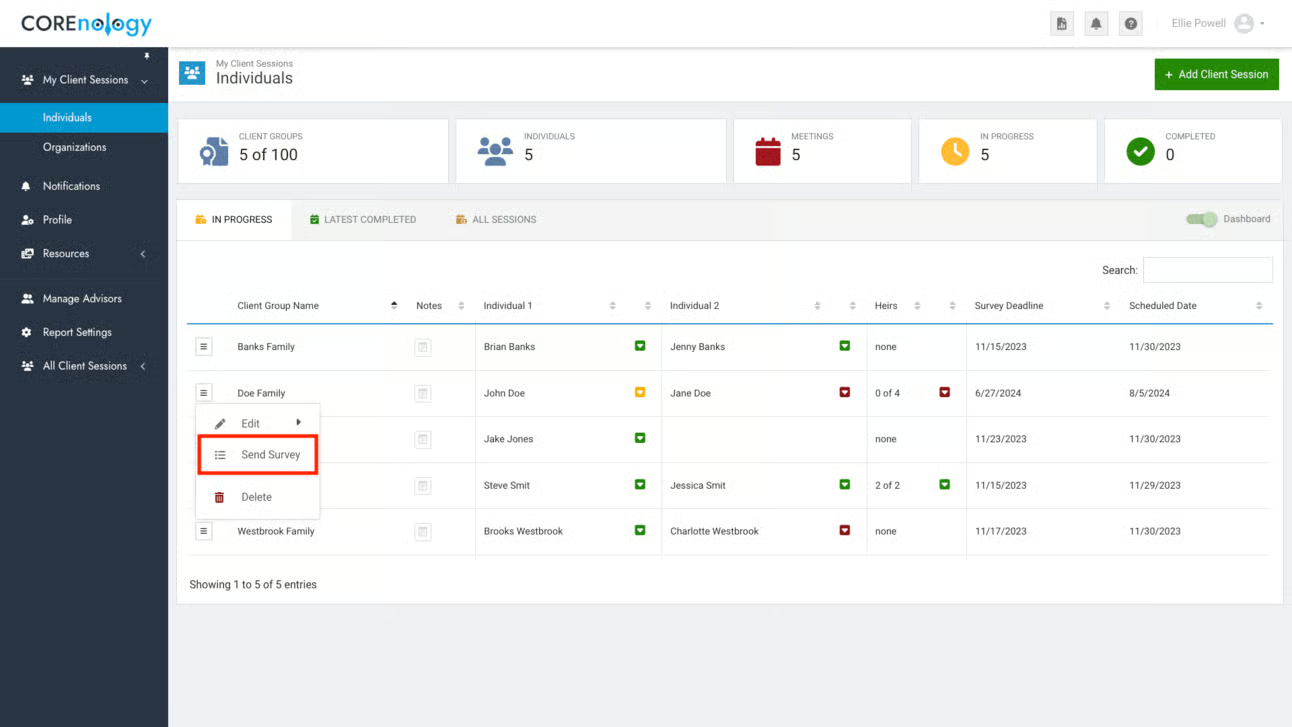
To generate your client’s unique links, head to the COREnology toolkit to select (or create) the Client Group, and click “Send Survey.”
Step 2
Select the email addresses to which you’d like to send the invitations.

Step 3
Select the COREgiving assessment, then click “Next.” (Make sure other assessments are not selected. COREvalues is typically selected by default.)

Step 4
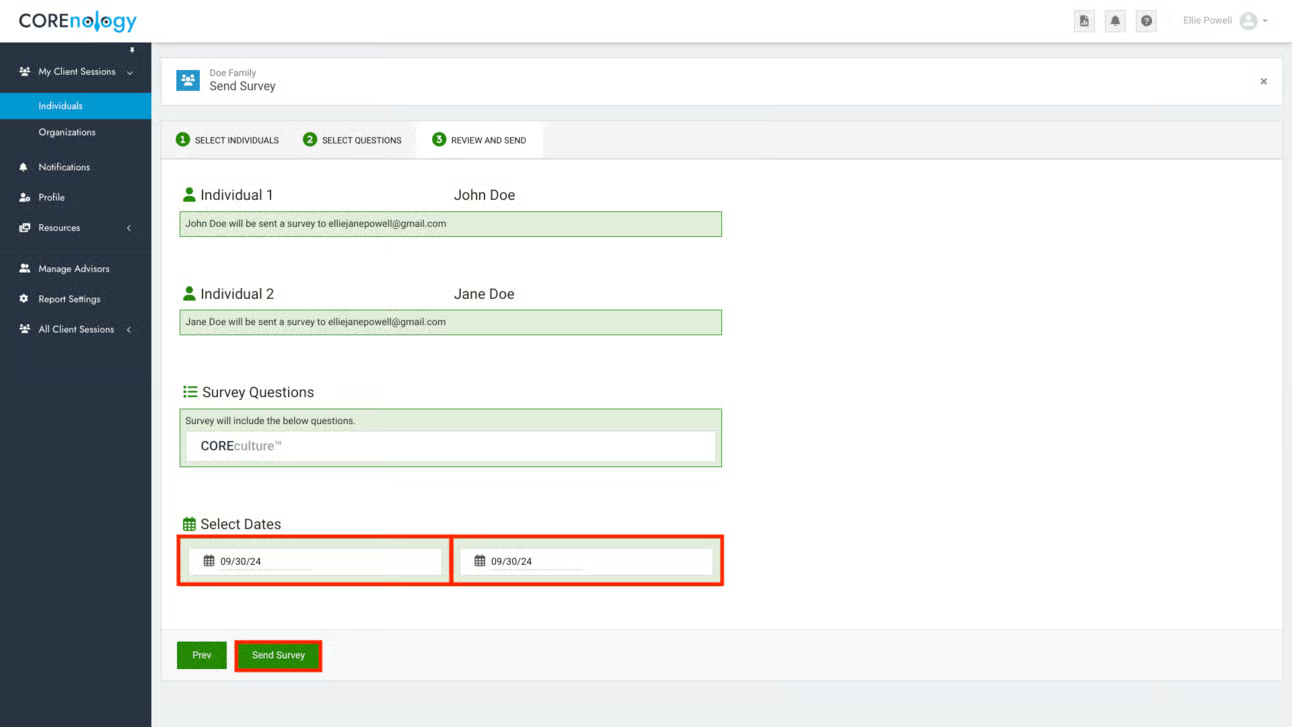
Review the details of this page. Select a date by which to complete the survey.
Click Send Survey.
Generating the report
Follow these instructions to send your clients the report containing the results of their COREgiving assessment:
Step 1
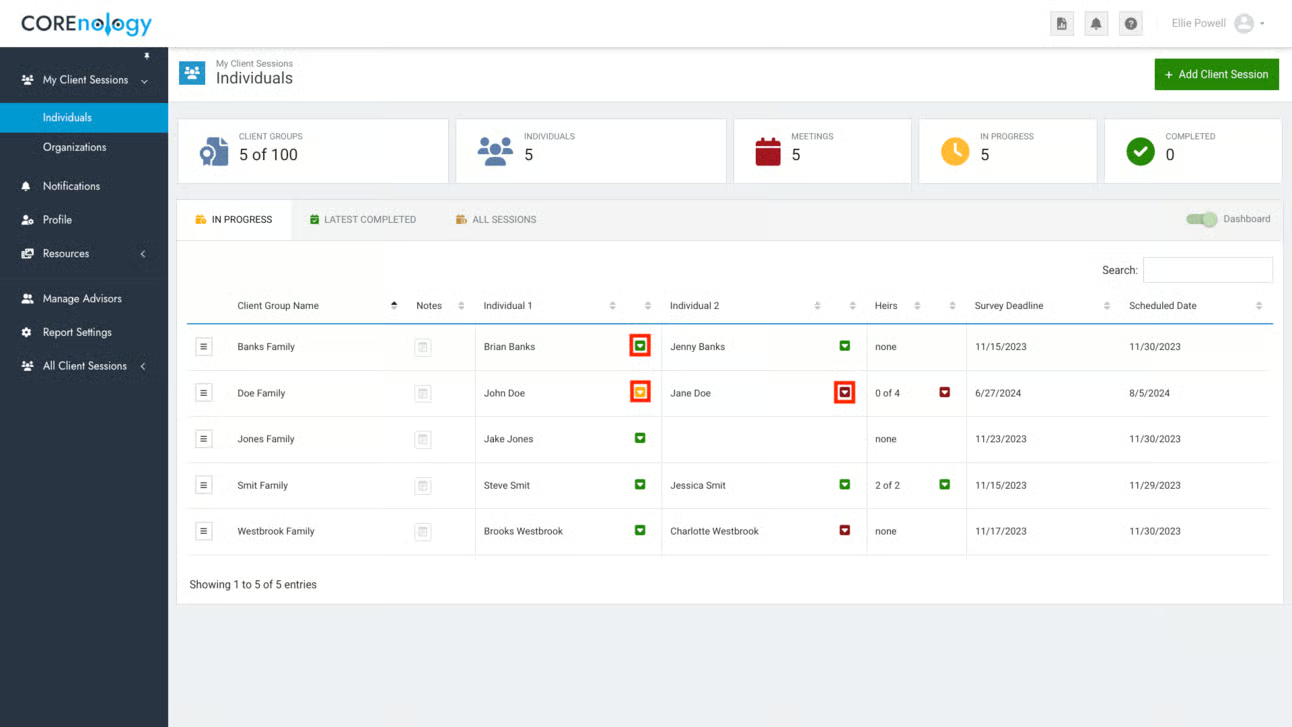
Check the dashboard for the status of the assessment.
A red box next to a client’s name means they haven’t started the assessment.
A yellow box means they’ve started the assessment, but haven’t completed it.
A green box means the assessment has been completed.
If several days have passed and the assessment is incomplete, send a reminder email to your client (template below).
Once all assessments are completed, click on the Client Group, then click “Generate Report”.
You can download the report as a PDF, and send it to your client via email.
COREgiving Assessment Invitation Email Template
Instructions
Feel free to use or modify this email template to send your clients their COREgiving report.
Copy the text below, then paste it into your email. You can paste without the formatting (highlights and background colors) using the keys Ctrl + Shift + V on Windows and Cmd + Shift + V on Mac.
Subject Line Ideas
- We care about your family’s giving story
- Evaluating your family’s philanthropy
- Leaving a legacy of giving
Body Copy:
[First Name(s)],
At [Firm Name] we care about your family and their legacy.
We all know the saying, “It is more blessed to give than to receive.” Studies back this up over and over again. Every family, no matter their financial situation, can enjoy a legacy of generosity.
- [Partner 1 name and link]
- [Partner 2 name and link]
- [Heirs link]
I look forward to getting your COREgiving report and meeting to discuss it.
Best,
[Your Name]
COREgiving Assessment Reminder Email Template
Instructions
Feel free to use or modify this email template to send your clients their COREgiving report.
Copy the text below, then paste it into your email. You can paste without the formatting (highlights and background colors) using the keys Ctrl + Shift + V on Windows and Cmd + Shift + V on Mac.
Subject Line Ideas
- We care about your family’s giving story
- Evaluating your family’s philanthropy
- Leaving a legacy of giving
Body Copy:
[First Name(s)],
Touching base to remind you about the COREgiving assessment I shared with you.
The assessment takes just 5-10 minutes to complete and will provide meaningful insights into your family relationships.
You, your partner, and your heirs can take the assessment using the links below:
- [Partner 1 name and link]
- [Partner 2 name and link]
- [Heirs link]
If you have questions about this assessment, please let me know. I’d be happy to talk with you about it.
Best,
[Your Name]